
Did the Volatility TryHackMe room! Volatility is used by SOC analysts to analyze memory dumps (digital artifacts that tell a malware’s whereabouts and impact on the system). It is made up of Python plugins, added my own: https://github.com/cybersecbella/volatility3/
Automatically tags findings (processes) with MITRE ATT&CK techniques, provides detailed explanations to create an Incident Report, and lets you query memory dumps (for suspicious processes, network connections, etc.) in natural language
Also made a cheatsheet :) Cheatsheet link: https://www.cybersecbella.com/articles/volatilitycheatsheet/
When analyzing memory dumps, the first step is to identify the image type. To extract memory off a virtual machine, instructions here: https://www.cybersecbella.com/articles/pwf/
If the evidence is not on a virtual machine, these tools can be used to extract a raw image from a bare-metal machine (A lab can be built out with a bare-metal server and all of its RAM being used instead of a VM having to work within an allocated RAM amount).
- FTK Imager
- Redline
- DumpIt.exe
- win32dd.exe / win64dd.exe
- Memoryze
- FastDump
Extracting memory means extracting the virtual memory from the host’s drive. This leaves you with a raw file. It is recommended to use Volatility3 (most recent version) as it identifies the host and build of any memory file. Use plugin imageinfo() to find the OS profile if using Volatility version 2. Other versions require a specific OS version.
Volatility3 can work on all OS versions. This also means you have to specify the OS before using a plugin. For example all do the same but on an different OS:
- windows.info
- linux.info
- mac.info
Updated notes
(1) Netstat plugin (lists all active and closed network connections that existed during the memory dump) can be unstable in Volatility3. Use bulk_extractor (extracts a PCAP file) to get this information instead. Bulk_extractor: https://www.kali.org/tools/bulk-extractor/
(2) yarascan plugin compares strings, patterns, compound rules against a rule set. A yara rule classifies malware based on patterns. rule name, metadata/description, strings (specific text to search for), and a condition. It can identify if there is a specific malware on a system.
Example:
python3 vol.py -f <image.raw> windows.vadyarascan --yara-rules "/path/to/rules.yar"
How to uncover malware hiding within memory
Hooking are techniques adversaries use to modify an execution flow on an OS before the flow reaches the destination. For example a program calls an API. An attacker may insert a malware which alters the execution path of the API call. The malware can read the data being passed or pass on new instructions. The API call is replaced by a malicious payload and is executed by the OS.
Attackers hook 5 ways:
- SSDT Hooks -Stands for System Service Descriptor Table -Use ssdt plugin (ex. windows.ssdt) -Attacker hooks into the SSDT table to modify pointers (points to a different location) -Tip: Look at initial compromise, then use ssdt plugin to compare at time of dump
- IRP Hooks
- IAT Hooks
- EAT Hooks
- Inline Hooks
TryHackMe Volatility Room Walk Through
Raw memory dump images to be analyzed are in /Scenarios/Investigations/
Attacker sent a malicious banking trojan as an Adobe document and company has the raw memory dump for Case 001.
vol -f /Scenarios/Investigations/Investigation-1.vmem windows info
Using found 2 key artifacts: Build version of host machine: 2600.xpsp.080413-2111
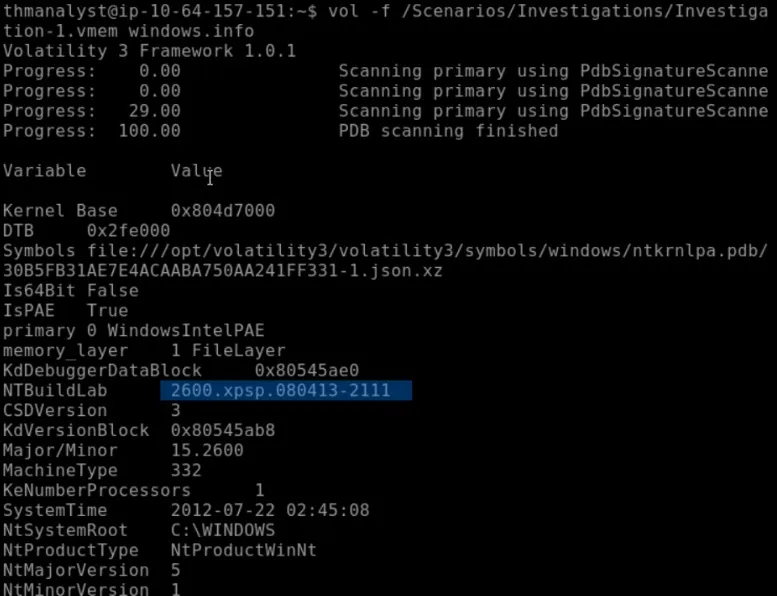
Looking at the same photo can find: Time the memory file was acquired: 2012-07-22 02:45:08
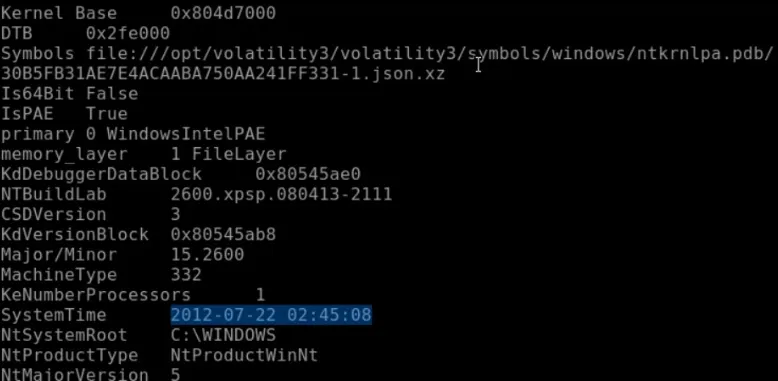
Q2)
vol -f /Scenarios/Investigations/Investigation-1.vmem windows.pstree
Pstree shows running processes as tree structure. Compare well known processes to find suspicious processes: reader_sl.exe
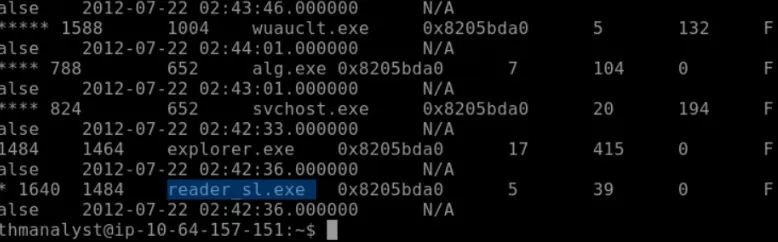
Parent process: explorer.exe (first process with 1464 - matching process id to suspicious process)
PID of suspicious process: 1640 PID of parent process: 1484
Q3)
vol -f /Scenarios/Investigations/Investigation-1.vmem -o /tmp windows.memmap.Memmap --pid 1640 --dump   #stores the dump in /tmp
strings /tmp/pid.1640.dmp | grep -i "user-agent"   #searches the dump in /tmp
Using suspicious process PID and windows.memmap (bridge between hard drive and memory; Can read datasets as if loaded into memory w/o running out of memory.)
User agent attacker employed: Mozilla/5.0 (Windows; U; MSIE 7.0; Windows NT 6.0; en-US

Q4)
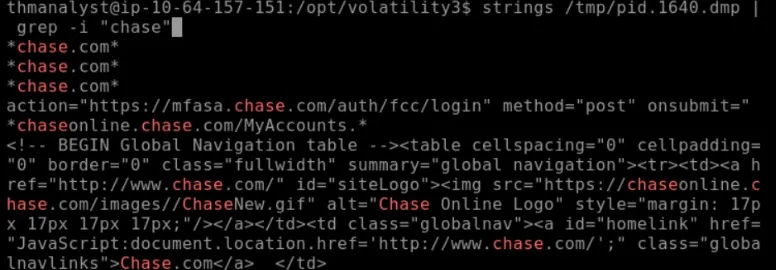
strings /tmp/pid.1640.dmp | grep -i “chase” #look using command grep in dmp for a string format matching chase
Was Chase Bank one of the suspicious domains? Yes
Case 002
Chain of ransomware has hit the company. Found the decryption key and have a raw memory dump for Case 002.
vol -f /Scenarios/Investigations/Investigation-2.raw windows.pstree
Suspicious process in Case 002: @WanaDecryptor@
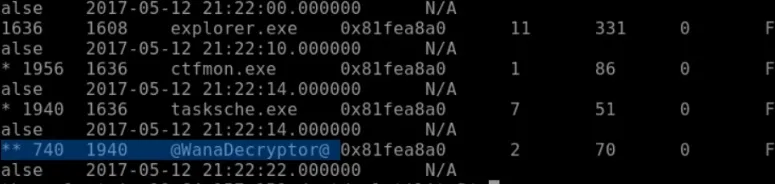
Parent process: 1940
What is the suspicious parent process PID connected to the decryptor in Case 002? Belongs to tasksche.exe
Q2)
vol -f /Scenarios/Investigations/Investigation-2.raw -o /tmp windows.memmap.Memmap --pid 740 --dump  #did a dump for process id 740
strings /tmp/pid.740.dmp | grep -i wana #search for wana using grep
Full path of the suspicious binary in PID 740 in Case 002: C:\Intel\ivecuqmanpnirkt615@WanaDecryptor@.exe
What malware is present? WannaCry

Q3)
What DLL is loaded by the decryptor used for socket creation in Case 002? Did some googling: ws2_32.dll (Used for low-level TCP/IP networking to spread via the MS17-010 EternalBlue exploit)
Q4)
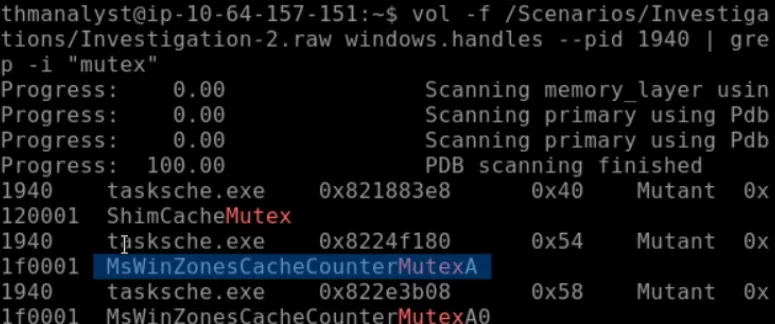
vol -f /Scenarios/Investigations/Investigation-2.raw windows.handles --pid 1940 | grep -i "mutex"
Windows.handles lists every single open resource handle (files, registry keys, mutexes, et.c) used by running processes. 1940 targets the tasksche.exe and grep searches for the string mutex in the raw file.
What mutex can be found that is a known indicator of the malware in question in Case 002? MsWinZonesCacheCounterMutexA
Q5)
What plugin could be used to identify all files loaded from the malware working directory in Case 002? windows.filescan