
Reference: @sleuthkit — core forensics toolkit - https://github.com/sleuthkit/sleuthkit
@libyal — EWF image handling - https://github.com/libyal/libewf
@msuhanov/dfir-orc — DFIR orchestration - https://github.com/DFIR-ORC/dfir-orc
@volatilityfoundation/volatility3 - Volatility3 - https://github.com/volatilityfoundation/volatility3
@tomchop/volatility3-autoruns - VolatilityAutoRuns - https://github.com/tomchop/volatility-autoruns
The Sleuth Kit (TSK) is a unix based, C library with command line tools (no GUI required) that analyze disk images during incidence response. An ordinary disk contains one or more partitions (slices) that each have a file system (File Allocation Table (FAT), and New Technologies File System (NTFS), etc.). The content layer of a file system holds the data in blocks, clusters, and fragments. The metadata layer details a file or directory, specifically its dates and size or address. The human interface layer is easier for humans to engage with files rather than the metadata layer. TSK is the base for Autopsy, a GUI that supports this.
Related tools:
fsstat - shows file system details in ASCII format
blkcat - show contents of a specific unit of file system
istat - shows metadata information in ASCII format * can look at a specific structure *
ffind - identifies name of a file that has an allocated metadata structure * can find deleted files *
TSK has 6 layers:
Base Layer: basic layer with programming and data structure functions
Disk Image Layer: disk images (various forms) opened and processed here
Volume System Layer: tells the start and end location of each partition; Processes data as DOS partition tables or BSD disk label structures
Pool Layer: manages pools of blocks in different volumes which means a volume can have non-consecutive blocks
File System Layer: processes data as a file system; Functions let a user read data from a file
Hash Database Later: comprised of hash databases; Can do a fast lookup of an hash
Brought together by an Automation Layer that integrates layers – uses TskAuto (C++ class)
Useful commands in TSK:
sudo apt install sleuthkit
Installs sleuthkit
mmls disk.img
List all partitions in a disk image. Should be run first to find the byte offset of each partition.
mmstat disk.img
Show the partition type of a disk image.
fsstat -o 2048 disk.img
Print file system metadata; -o is the sector offset from mmls output.
fls -r -o 2048 disk.img
List all files and directories recursively; Can add a -d before -o to recover deleted evidence
ifind -o 2048 -n "passwords.txt" disk.img
Find the inode number for a file by name even if the name is deleted
istat -o 2048 disk.img 45623
Show metadata for inode 45623 — timestamps (MAC times), permissions, size, data blocks, etc.
icat -r -o 2048 disk.img 45678 > recovered.docx
Extract file content by inode number; Works on deleted files if blocks haven’t been overwritten
fls -r -m / -o 2048 disk.img > bodyfile.txt
mactime -b bodyfile.txt -d > timeline.csv
(1) fls creates a bodyfile (inode metadata), (2) mactime turns it into a sorted timeline Use to prove when files were accessed, modified, or created
md5sum disk.img
sha256sum disk.img
Creates hashes for a disk image
Chain of custody is essential for an analyst. Hashing the evidence before and after analysis, then checking if they match ensures the image and data has not been altered.
Libewf is an open-source library for interacting with EWF (Expert Witness Format) using .E01 and .Ex01 file formats. The library lets you read embedded metadata, mount images as virtual devices, and convert between formats. TKS calls libewf functions automatically when you open a .E01 file. .E01 and .Ex01 are common formats for evidence images.
sudo apt install libewf-dev ewf-tools   #installs ewfinfo, ewfverify, ewfmount
pip install pyewf                        #Python bindings
ewfinfo evidence.E01
Print all metadata embedded in image: acquisition date/time, examiner name, case number, device model, serial number, hashes. Cite this in your forensic report.
ewfverify evidence.E01
Recompute the hash of every sector and compare to the stored hash. Should return “verified” if the image has not been modified. Chain of custody
DFIR ORC (Orchestrated Response and Collection) is a Windows collection framework built by ANSSI (France’s cybersecurity agency). ORC deploys a single self contained .exe to Windows machine which collects the forensic artifacts needed (registry hives, MFT, prefetch files, event logs) and compresses everything to upload it to a central server. It is useful when incident responders cannot image every machine individually.
git clone --recursive https://github.com/DFIR-ORC/dfir-orc
cd dfir-orc
.\Build-Orc.ps1         # requires VS 2022 Build Tools
Installs tools: Build produces DFIR-Orc_x86.exe and DFIR-Orc_x64.exe
DFIR-Orc.exe NTFSInfo /out=C:\output\ntfs.csv
Parse the MFT and dump every file’s metadata (name, timestamps, size, attributes) to a CSV.
DFIR-Orc.exe SystemInfo /out=C:\output\system.xml
Collect OS version, installed software, user accounts, network config, and running services in one shot.
DFIR-Orc.exe GetThis /sample=*.evtx /out=C:\output\logs\
Collect all Windows Event Log files (.evtx) from the machine.
DFIR-Orc.exe FastFind /out=C:\output\iocs.csv ^
  /yara=malware_rules.yar
Scan the entire filesystem for files matching YARA rules.
Critical commands in this order:
mmls — list partitions in a disk image
mmls disk.img
fls — list files (including deleted ones) in a partition
fls -r -d disk.img
icat — extract a file by its inode number
icat disk.img 12345 > recovered_file.txt
mactime — build a timeline of file activity
fls -r -m / disk.img | mactime -b - > timeline.csv
Memory Analysis
Volatility 3 and AutoRuns
The Volatility Framework is an open-source memory forensics platform used to extract digital artifacts from RAM. It specifically finds running processes and possible backdoors for persistence behavior.
git clone https://github.com/volatilityfoundation/volatility3
cd volatility3
pip install -e .
python3 vol.py -h
Install volatility3
| Category | Name | Explanation |
|---|---|---|
| Process Analysis (1) | windows.info | Run this FIRST when running a windows dump. Tells you Windows version, build, kernel base address. Helps Volatility pick the right symbol table. |
| Process Analysis (2) | windows.pslist | Lists all running processes. Malware that unlinks itself from PsActiveProcessHead linked list will NOT appear here — must run psscan aswell. |
| Process Analysis (3) | windows.psscan | Scans for processes by EPROCESS structures (undocumented Windows kernel which holds processes). Run pslist and psscan. If anything in psscan but NOT in pslist = hidden/rootkit process. |
| Process Analysis (4) | windows.pstree | Shows parent-child process relationships; suspicious if cmd.exe spawned by powershell/browser with no parent = living off the land attack (attacking with legitimate, pre-installed software) |
| Process Analysis (5) | windows.cmdline | Shows command lines for each process Malware hides in the cmdline ex. C2 URLs passed as arguments |
| Code Injection Detection (6) | windows.malfind | Find injected code and reflective DLL in memory; Looks in memory regions that are executable for readable/writable MZ headers |
| Code Injection Detection (7) | windows.dlllist | Lists DLLs loaded from each process and from unusual places; Investigate DLL hijacking. |
| Network Connections (8) | windows.netsat | Shows which processes had open network connectins during dump. Shows possible backdoor; Look at pstree: Any suspicious process have an outbound connection? |
| Registry + Credentials (9) | windows.registry.hivelist | Shows registry hives; The Run key is where most basic persistence lives. |
| Registry + Credentials (10) | windows.hashdump | Dumps NLTM hashes * NT LAN Manager hash = cryptographic format to store user passwords* from SAM database in memory. Investigate stolen credentials. |
| Filesystem Artifacts (11) | windows.filescan | Scans for files opened by OS during dump, even if files deleted from disk; Procedure: filescan → find suspicious file → dumpfiles → submit to VirusTotal. |
| Driver / Rootkit Detection (12) | windows.driverscan & windows.modules | Find kernel drivers and loaded modules |
| Autoruns (13) | windows.autorun.Autoruns | Finds persistence mechanisms. Checks in Run/RunOnce registry keys, services, AppInit DLLs, Winlogon entries, scheduled tasks, active setup; Check if matches with running processes — tells you if the persistence entry is currently active. |
| Autoruns (14) | –asep flag | Specific persistence type; Common Malware persistence methods: Looks at Run services and tasks first. |
| Autoruns (15) | –verbose flag | Shows entries normally filtered; Show legitimate System32 services; Use if you suspect a legitimate binary has been replaced. |
two dashes = –
Commands:
windows.info
python3 vol.py -f memory.dmp windows.info
windows.pslist
python3 vol.py -f memory.dmp windows.pslist
windows.psscan
python3 vol.py -f memory.dmp windows.psscan
windows.pstree
python3 vol.py -f memory.dmp windows.pstree
windows.cmdline
python3 vol.py -f memory.dmp windows.cmdline
python3 vol.py -f memory.dmp windows.cmdline --pid 1234
windows.malfind
python3 vol.py -f memory.dmp windows.malfind
python3 vol.py -f memory.dmp windows.malfind --pid 1234 -D ./dump/
windows.dlllist
python3 vol.py -f memory.dmp windows.dlllist --pid 1234
windows.netstat
python3 vol.py -f memory.dmp windows.netstat
windows.registry.hivelist
python3 vol.py -f memory.dmp windows.registry.hivelist
python3 vol.py -f memory.dmp windows.registry.printkey --key "Software\Microsoft\Windows\CurrentVersion\Run"
windows.hashdump
python3 vol.py -f memory.dmp windows.hashdump
windows.filescan
python3 vol.py -f memory.dmp windows.filescan | grep -i ".exe"
python3 vol.py -f memory.dmp windows.dumpfiles --virtaddr 0xADDRESS -D ./dump/
windows.driverscan + windows.modules
python3 vol.py -f memory.dmp windows.driverscan
python3 vol.py -f memory.dmp windows.modules
python3 vol.py -f memory.dmp windows.ssdt
windows.autorun.Autoruns
python3 vol.py --plugin-dirs ./volatility3-autoruns/plugins \
  -f memory.dmp windows.autorun.Autoruns
–asep flag
python3 vol.py -f memory.dmp windows.autorun.Autoruns --asep services
python3 vol.py -f memory.dmp windows.autorun.Autoruns --asep autoruns services
python3 vol.py -f memory.dmp windows.autorun.Autoruns --asep tasks
–verbose flag
python3 vol.py -f memory.dmp windows.autorun.Autoruns --verbose
Conclusion
The collection of these tools make up an Incident Report.
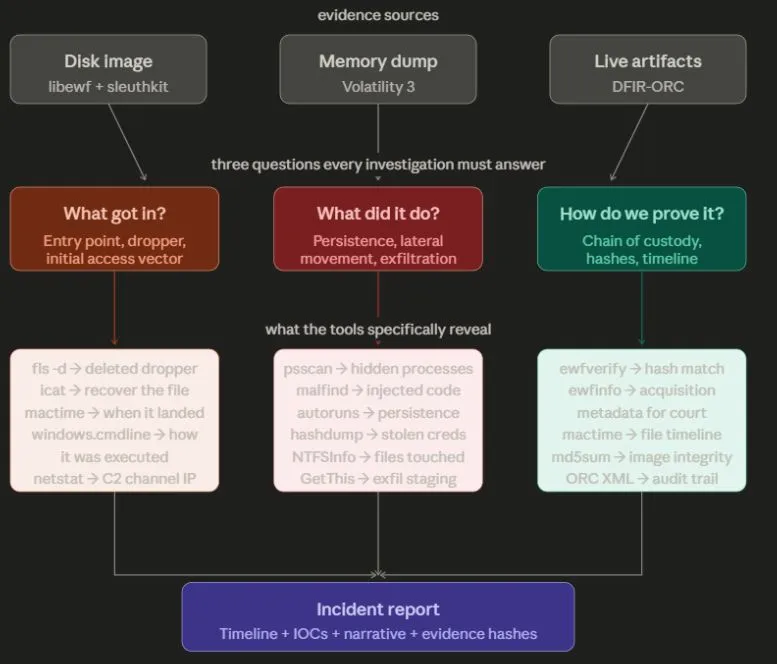
Disk image - Libewf and sleuthkit - A disk image holds existing files. Using fls and mactime a timeline of every file created, accessed, modified, and deleted can be compiled. Ewfverify and the hashes verify that the evidence has not been tampered with; Can present this in court.
Memory forensics - Volatility - Memory holds the running processes and possible backdoors. Malfind, psscan, hashdump, and netstat look for fileless malware, injected shellcode, and stolen credentials. Advanced threats are hidden here and not found in disk, which is why it is vital to use volatility to identify entry points and active threats to a network.
DFIR-ORC - scale - Realistically an attacker will not go after one machine. A breach may have multiple endpoints and machines compromised. ORC can deploy a single executable that collects all the artifacts (event logs, the MFT, prefetch files, registry hives) needed from every machine simultaneously to compile a case and take further steps to remediate.