
Introduction to GPUs — Kernels & Threads
I’m currently flinging myself into the vat of GPUs. Before we jump in (thank you for being my buddy in this) a few things to note.
Latency vs. Throughput (CPU vs. GPU): CPUs — run sequential tasks as fast as possible (low latency) using huge caches vs. GPUs sacrifice single-thread speed to process simpler tasks at the same time (high throughput)
Concurrency vs. Parallelism: Concurrency is about dealing with lots of things at once, while parallelism is about doing lots of things at the same time. GPUs are built for massive data parallelism
GPUs are memory bound. They do lots of math. They’re nerdy that way, but the hierarchy of how the memory is processed is important to understand.
-
Registers: Each Streaming Multiprocessor (SM) has a massive register file → each active thread gets assigned to registers → issue: if a single thread demands too many registers, the GPU can’t run as many threads simultaneously → may have to “spill” registers into slower VRAM
-
Shared Memory (SRAM on-chip): GPU shared memory is programmer-managed cache → load data from global VRAM into shared memory once → reuse it hundreds of times across threads in that block without hitting VRAM again
Ex. Thread 0 reads address X, thread 1 reads X+1, thread 2 reads X+2…memory controller combines (coalesces) them into a single bulk memory transaction → issue: threads have random addresses → memory controller issues multiple separate transactions → destroying effective bandwidth
- Hiding Latency via Warps: GPUs use brute-force thread use: when Warp A executes an instruction that has to wait 600 cycles for data from VRAM → SM’s warp scheduler swaps to Warp B, C, or D that already have their data ready to execute computations
GPUs
NVIDIA produces GPUs (Graphic processing units). GPUs differ from CPUs in their computational capabilities. They are able to do more complex math functions which makes them a greater use for training models.
GPUs are the brain of the model. GPUs are written in CUDA (similar to C++) or Triton (OpenAI’s version). A kernel is a function executed on the hardware and a thread is an individual execution running that function. The function runs on the GPU (device) rather than the CPU (host).
A kernel function has the global specifier which indicates that this function will be executed on the GPU by many threads in parallel, and it can be called from the CPU (host). The GPU launches the same kernel multiple times in parallel across different threads. The amount of threads are defined as well. SPMD (Single Program, Multiple Data) is how every thread runs the exact same code on its own chunk of data.
Threads is the smallest unit of execution. If a CPU would launch 10,000 threads, the system would crash due to context switching. NVIDIA’s GPUs make threads hardware-managed and lightweight when switching. Each thread has its own set of hardware registers, instruction pointer, execution state, and unique ID (threadIdx) to map which slice of memory to read and write to.
- Bundled into a warp: 32 consecutive threads
- SM: Streaming Multiprocessor (SM) executes instructions at the warp level
- Thread Block: group of threads on a single SM → Shared Memory → synchronize execution using barriers ex. __syncthreads()
- Grid: collection of blocks launched by a single kernel call
The way to program these GPUs is through CUDA (a language similar to C++).
CUDA Introduction
Nvcc4jupyter — (NVIDIA CUDA Compiler) directly within Jupyter or Colab notebooks; allows you to write and compile CUDA C/C++ code
%%cuda — tells the Colab environment to compile and run the following code using the NVIDIA CUDA Compiler (nvcc)
2 libraries needed:
#include <stdio.h>
# include <cuda_runtime.h> — core CUDA API functions and types
CUDA does not use loops like this:
// CPU: One thread doing 1000 steps sequentially
for (int i = 0; i < 1000; i++) {
    C[i] = A[i] + B[i];
}
/*output:
Output looks like:
Thread 0: C[0] = A[0] + B[0]
Thread 1: C[1] = A[1] + B[1]
…Thread 517: C[517] = A[517] + B[517]
*/
Pointers (A, B, C) hold data like input and output pixels for Image processing, weights/gradients/activations for Deep Learning, etc.
For example instead of for loops:
%%cuda //tells the Colab environment to compile and run the following code using the NVIDIA CUDA Compiler (nvcc)
#include <stdio.h>
#include <cuda_runtime.h>
//cuda_runtime = core CUDA API functions and types

// kernel function that runs on the GPU hardware
__global__ void simpleKernel() {
    int idx = threadIdx.x; //1Dimensional
    printf("Iteration %d \n", idx);
}

int main() {
    simpleKernel<<<1, 14>>>(); //1 block, 14 threads per block
    cudaDeviceSynchronize(); //;et GPU finish task before CPU closes
    return 0;
}

/*
1 = block number; 14 = number of threads in this block

output:
Iteration 11
Iteration 12
Iteration 13
Iteration 0
Iteration 1
Iteration 2
…
Covers all Iteration 0 - 13
1  * 14 = total of 14 threads
//GPUs give random accesses, that's why it is not a chronological order
*/
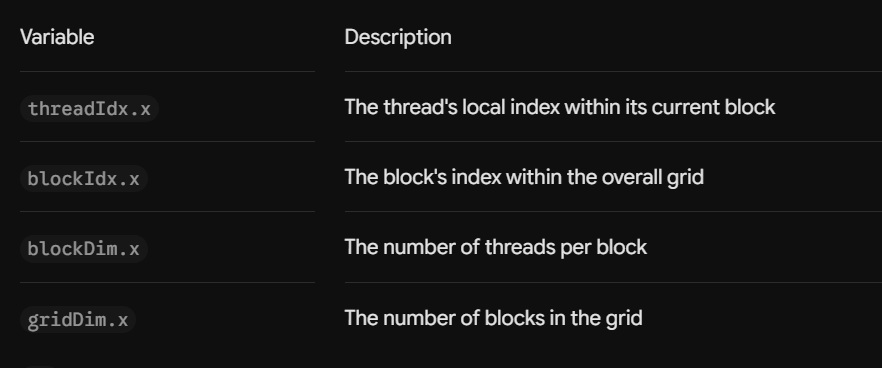
ex. Block 2 has 256 threads, what does thread 5 inside that block contain?
Global ID = (blockIdx.x * blockDim.x) + threadIdx.x = (2 * 256) + 5 = 517
Thread 5 goes to index 517 in arrays
GPU Architecture
GPU benefit — can parallel process with thousands of cores + smaller cache per core
CPU — uses SIMD = Single Instruction Multiple Data
GPU — uses SIMT = Single Instruction, Multiple Thread (execute the same instruction on different threads of data parallely)
CUDA follows these 5 steps:
- Allocate memory on both CPU and GPU
const int N = 1024; // num of elements in each array
size_t size = N * sizeof(float); //total memory 1024 * 4 = 4096 bytes
// Host arrays //allocates C++ memory for CPU // host = CPU
float *h_a, *h_b, *h_c; // * pointer
h_a = new float[N];
h_b = new float[N];
h_c = new float[N];
// Device arrays //device = GPU //allocates 4096 bytes into GPUs's memory (VRAM)
float *d_a, *d_b, *d_c;
cudaMalloc(&d_a, size); //& takes the addr of the pointer - points to GPU memory addr
cudaMalloc(&d_b, size);
cudaMalloc(&d_c, size);
- Transfer input data from CPU to GPU
// Initialize host arrays // initialize data + copy to GPU
for (int i = 0; i < N; i++) {
h_a[i] = i; //CPU puts starting vals
h_b[i] = i * 2;
}
// Copy data to device // copies CPU RAM to GPU VRAM
cudaMemcpy(d_a, h_a, size, cudaMemcpyHostToDevice);
cudaMemcpy(d_b, h_b, size, cudaMemcpyHostToDevice);
- Launch the kernel on the GPU
 // Launch kernel
    int threadsPerBlock = 256;
    int blocksPerGrid = (N + threadsPerBlock - 1) / threadsPerBlock;
    vector_add<<<blocksPerGrid, threadsPerBlock>>>(d_a, d_b, d_c, N);
// spawn a grid of 4 blocks each with 256 Threads...all running vector_add in parallel
// 1 instruction, multiple threads // device pointers given bc GPU cannot dereference CPU pointers
- Transfer output data back from GPU to CPU
    // Wait for kernel to complete queue tasks
    cudaDeviceSynchronize();
    // Copy result back to host
    cudaMemcpy(h_c, d_c, size, cudaMemcpyDeviceToHost);
// pushes output array from GPU VRAM to CPU RAM
- Clean up memory on both devices
    cudaFree(d_a); // frees allocations made by GPU
    cudaFree(d_b);
    cudaFree(d_c);
    delete[] h_a; // frees C++ heap on CPU
    delete[] h_b;
    delete[] h_c;
GPU arrays can have differnet dimensions, like 1D and 2D. The indexing is done differently.
1Dimensional looks like:
__global__ void process1D(float *outarray, int n) {
    int idx = blockIdx.x * blockDim.x + threadIdx.x; //global thread index

    //check bounds to prevent out of bound errors
    if (idx < n) {
        outarray[idx] = idx * 3.0f;
    }
}

/*output

Array size: 1024 elements
  Block size: 256 threads
  Grid size: 4 blocks
First 10 results: 0.00 3.00 6.00 9.00 12.00 15.00 18.00 21.00 24.00 27.00

*/
1D is used for: Audio, vectors, flat lists, token arrays
2Dimentional looks like:
__global__ void process2D(float *outarry, int width, int height) {
    // 2D uses row and col
    int col = blockIdx.x * blockDim.x + threadIdx.x; //col x
    int row = blockIdx.y * blockDim.y + threadIdx.y;  // row y

    // Calculate linear index from 2D coordinates
    int idx = row * width + col;

    // bound check
    if (col < width && row < height) {
        outarray[idx] = (row * width + col) * 2.0f;
    }
}

/*output

  Matrix size: 32 x 32 = 1024 elements
  Block size: 16 x 16 threads
  Grid size: 2 x 2 blocks


Results (top-left 5x5 corner):
  Row 0:     0.00     2.00     4.00     6.00     8.00
  Row 1:    44.00    46.00    48.00    50.00    52.00
…
*/
2D is used for: Images, video frames, 2D matrices, heatmaps
3Dimensional
__global__ void process3D(float *outarray, int width, int height, int depth) {
    //x, y, z coordinates
    int x = blockIdx.x * blockDim.x + threadIdx.x;
    int y = blockIdx.y * blockDim.y + threadIdx.y;
    int z = blockIdx.z * blockDim.z + threadIdx.z;

    //linear index
    int idx = z * (width * height) + y * width + x;

    //bound checks
    if (x < width && y < height && z < depth) {
        outarray[idx] = (z * width * height + y * width + x) * 2.0f;
    }
}

/*output

Volume size: 8 x 8 x 8 = 512 elements
  Block size: 4 x 4 x 4 threads
  Grid size: 2 x 2 x 2 blocks

Results (z=0 slice, top-left 5x5 corner):
  Row 0:     0.00     2.00     4.00     6.00     8.00
  Row 1:    10.00    12.00    14.00    16.00    18.00

*/
One thing to note: When defining the blocks x, y, z dimensions. It goes in the order (x, y, z). But when looking into the each block and each individual thread, it is read as (z, y, x). We always take the highest dimension first.
So setting the block would be (0, 1, 2) = (x, y, z)
When looking into the block, it is displayed as (2, 1, 0) = (z, y, x)
Warps
//Warp basics:
int tid = blockIdx.x * blockDim.x + threadIdx.x; //thread index
// Threads 0-31 = warp 0, 32-63 = warp 1...
int warp_id = threadIdx.x / 32; // 31/32 = 0…0th warp, 32/32=1…1st warp
int lane_id = threadIdx.x % 32;  // position within warp (0-31)
data[tid] = data[tid] + warp_id; // threads in warp execute this instruction together
What if I wanted to work on a flexible grid? AKA not just do 1D arrays
__global__ void flexibleGridStride(float *output, int n, float value) {
    //1D and 2D grid configurations //index for all dimension info
    int blockId = blockIdx.y * gridDim.x + blockIdx.x;
    int threadId = threadIdx.y * blockDim.x + threadIdx.x;
    int idx = blockId * blockDim.x + threadId;

    //total stride for any grid configuration =  active threads in the entire grid
    int stride = blockDim.x * blockDim.y * gridDim.x * gridDim.y;

    for (int i = idx; i < n; i += stride) {
        output[i] = value; // all elements up to n are processed
    }
}
Memory
To be very honest, in engineering I feel they make up words. Voxel. What is a voxel you may ask we’ll get there soon.
A 3D Volume Gaussian Blur moves from a 2D image (ex. smoothing pixels in a photo) into 3D grid of voxels (volumetric pixels). Used in MRI medical scans, seismic imaging, etc. A 3 x 3 x 3 blur kernel creates a cube of 27 voxels.
//voxel coordinates // 3D = x, y, z
    int x = blockIdx.x * blockDim.x + threadIdx.x;
    int y = blockIdx.y * blockDim.y + threadIdx.y;
    int z = blockIdx.z * blockDim.z + threadIdx.z;
Memory types:
- Global: slowest, accessible by all threads; in a grid
- Shared: data sharing within a block; fast for thread synchronization
- Local: slow; used in threads
- Constant: read-only & cached; fast
- Registers: used in threads; fastest!
Credit to:
- Programming Massively Parallel Processors — chapter 3: Multi grids and data; Authors: David B. Kirk, Wen-Mei W. Hwu, and Izzat El Hajj
- Programming Massively Parallel Processors — https://www.youtube.com/@pmpp-book/videos
- https://modal.com/gpu-glossary/readme
- https://docs.nvidia.com/cuda/cuda-programming-guide/02-basics/intro-to-cuda-cpp.html