
If you’d like to play around please clone my repo at https://github.com/cybersecbella/zero-trust-aws
git clone https://github.com/cybersecbella/zero-trust-aws.git
Firewalls
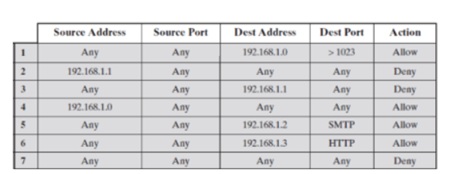
Firewalls act as the bodyguard at the entrance of a network. A data packet meets the firewall. The contents of the data packet are checked against the firewall’s rules. The incoming and outgoing traffic is inspected at this spot. Based on rules configured to a specific network, firewalls return an allow or deny. Also known as packet filtering; Filtering which packets can go in and out of a network.
Firewalls can either be stateless (they do not remember past interactions/do not store session data) or stateful (they do remember past interactions/stores session data). Proxy firewalls are placed inbetween the Internet and private network; they can inspect the contents of a packet. Whether a firewalls allows/denies entry to the private network is based on the content of the packet. Next generation firewall (NGFW) is an IPS which recognizes patterns of an attack and blocks the packet from entering the Network.
Built in rules have:
- Source address: The machine’s IP address that would originate the traffic
- Destination address: The machine’s IP address that would receive the data
- Port: The port number for the traffic
- Protocol: The protocol that would be used during the communication
- Action: the action that would be taken upon identifying any traffic of this particular nature
- Direction: the rule’s applicability to incoming or outgoing tr
Directions of rules:
- Inbound rules: rules apply to incoming traffic
- Outbound rules: rules apply to outgoing traffic
- Forward rules: forward specific traffic inside the network.
Firewalls can:
- Allow: Traffic inside packet does not interfere with rules; accept the data packet
- Deny: Traffic inside packet interferes with rules; block packet from entering
- Forward: sends traffic to a different network segment using forwarding rules; gateway between different network segments
Firewall log…an example of a network-centric log (logs that say what’s happening between the devices; source and dest ips, protocols, actions taken, tell a story of an attacker’s whereabouts)
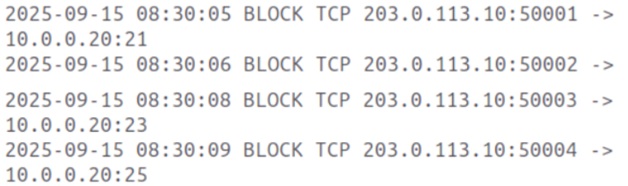
Means: The same external IP (203.0.113.10) is trying to connect to multiple ports on the same internal machine quickly. > attacker is performing a port scan trying to look for an open service to target.
Can check your inbound and outbound rules in Windows Defender
nftables – engine
Iptables – legacy interface to roughly that same engine
firewalld/ufw – wrappers
| Tool | Layer | Role | Output |
|---|---|---|---|
| iptables | netfilter (legacy interface) | Direct packet-filtering via tables/chains | rules with packet/byte counters, protocol, source/dest, target (ACCEPT/DROP/REJECT) |
| nftables | netfilter (modern engine) | unified filtering engine | ruleset dump: tables/chains/rules in nested, near-JSON-like syntax |
| firewalld | Management layer (on top of nftables/iptables) | Zone-based dynamic firewall management | Zone summary: interfaces, allowed services, open ports, rich rules |
| ufw | Management layer (on top of nftables/iptables) | Simple allow/deny | Simple status table: rule number, port/protocol, action (ALLOW/DENY), source |
Zeek
Network monitoring is the process of analyzing the availability/uptime of a service, performance, and network traffic configurations to look for potential threats to the network; Troubleshooting and finding the root cause of an issue is done as well. Network security monitoring adds a focus on network traffic and suspicious events. Zeek is a tool used for network monitoring.
Zeek can analyze events and logs to give an analysis of potential threats and actions needed. The Event Engine layer processes the packets and gives a description of the event while dividing them into parts (source and destination addresses, protocol identification, session analysis and file extraction).
The Policy Script Interpretation Layer is where the events are analyzed and correlated using zeek scripts. Zeek produces log files that help with network monitoring, intrusion detection, and threat hunting. It takes in a pcap file, analyzes the traffic in the packets, and produces logs. Zeek can attach a signature to chain multiple events (similar patterns, .sig extension). There’s much more to learn from zeek like signatures and frameworks like Extracting files, Hashes, Intelligence, and others.
sudo su #need superuser privileges
zeekctl #to start zeek
Run zeek service
sudo su
zeek -c -r sample.pcap #be in the folder that has the pcap #generates logs
ls -l #list logs shown
Generates logs for a pcap file
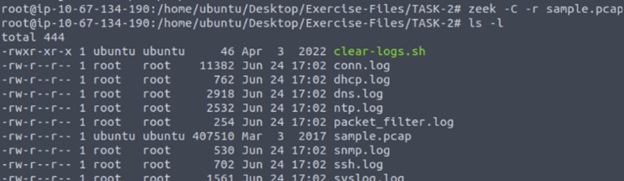
Once logs are generated can investigate with zeek-cut
cat dhcp.log | zeek-cut host_name #available hostname
cat dns.log  | zeek-cut query  #number of unique DNS queries
cat conn.log | zeek-cut duration | sort -n -r | head -n 1  #longest connection duration

Can find hostname in dhcp.log
Conn.log is the backbone which shows who talked to whom. Start investigating here. Protocol specific logs (dns, http, ssl, ssh) shows what the conversation is. Suspicious or malformed flags are found in weird.log and notice.log.
Hover over this for a table of detailed logs.Zero trust principles
Never trust, always verify — treat every packet as untrusted regardless of source IP or VPC origin
Least privilege access — restrict Security Group (SG) rules to exact ports/protocols needed (minimum access), not broad CIDR ranges CIDR (Classless Inter-Domain Routing) – allocating IP addresses and routing internet traffic (ex. 192.168.1.0/2)
Implementing Zero Trust Principles
- Microsegmentation — isolate workloads into separate subnets or VPCs to limit blast radius
- Assume breach — design controls assuming an attacker is already inside the perimeter
- Explicit allow-listing — default deny all, then grant specific access rather than blocking known threats
- Identity-aware access — tie network rules to IAM roles and instance identities, not just IP addresses
- Continuous verification — enforce re-authentication and re-authorization on session state changes
AWS Console
AWS Management Console – dashboard for AWS/AWS’s cloud platform where you can spin up servers, storage, or databases virtually (EC2 instances, S3 storage bucket, IAM users and roles)
- VPC (Virtual Private Cloud) – isolated virtual private network built within a public cloud network (like AWS, Google Cloud, etc.) where you can launch, connect, and manage your computing resources in a secure environment
- EC2 (Elastic Compute Cloud) Instance – a scalable virtual server in the AWS cloud that allows you to rent/run computing capacity; can deploy applications globally
Security Groups vs NACLs – both firewalls but work differently
Security Groups are stateful firewalls that control inbound and outbound traffic – return traffic is automatically allowed
NACLs (Network Access Control List) are stateless firewall used in cloud environments that acts at the subnet level to control traffic entering and leaving a subnet — both directions must be explicitly permitted
Hover over for a compare and contrast on SG and NACL.Security Group have rule limits (60 inbound/outbound per group). Combining both creates defense-in-depth — a misconfigured Security Group doesn’t automatically expose a subnet.
Project Architecture
Purpose: revolves around the Zero Trust principle – never implicitly trust traffic, every identity and rule has to be continuously verified
Building: A zero trust security automation toolkit for AWS with 5 tools
(1) SG Auditor (auditor/sg_auditor.py)
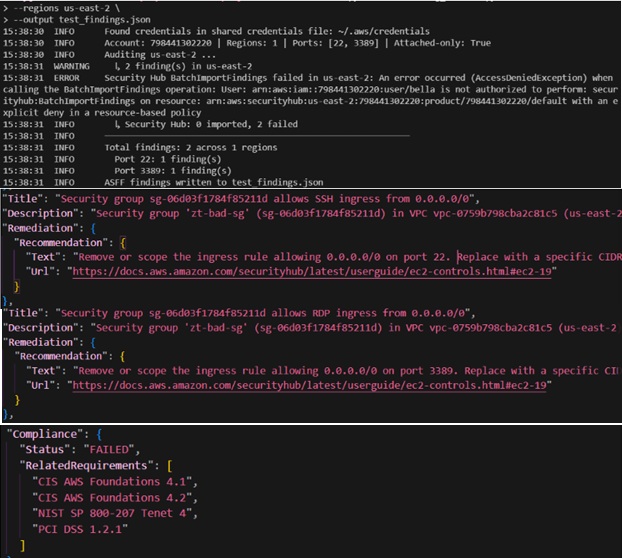
Purpose: Scans every Security Group in every AWS region in your account and flags any rule that allows unrestricted internet access (0.0.0.0/0 or ::/0) on admin ports like SSH (22) or RDP (3389).
Why it matters: An open port 22 to the entire internet is the single most common way AWS accounts get compromised.
What it produces: ASFF-formatted findings (Amazon Security Finding Format – JSON schema used by AWS Security Hub to aggregate compliance findings) posted directly to AWS Security Hub, which is AWS’s centralised security dashboard. It also exits with code 1 if findings exist, so it can act as a gate in CI — if someone accidentally opens port 22 to the world, the daily audit workflow fails and you get notified.
(2) Ansible automation: Ansible Hardening + AI Rule Reviewer
ansible/ — a set of Ansible playbooks that harden EC2 instances to the CIS (Center for Internet Security) Level 2 benchmark. CIS Level 2 is a published standard of 200+ security controls for Linux servers — things like disabling unused filesystems, hardening SSH config, enabling the audtid daemon, enforcing strict file permissions, and installing AIDE integrity checking.
The playbooks run in sequence: pre-scan → harden → post-scan → AI review
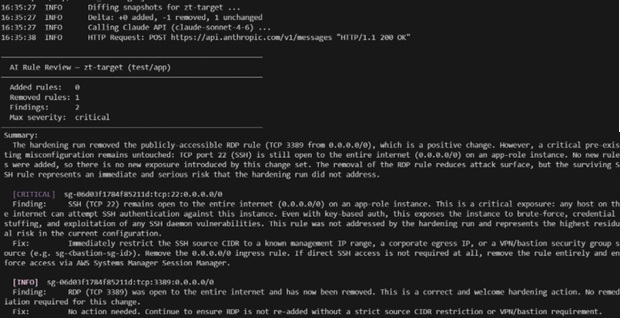
reviewer/sg_diff.py — the AI rule reviewer
Ansible runs > script takes a snapshot of the Security Group rules before and after the hardening run > sends the changed rules to Claude with context about what the instance does (its role, environment, owner tags) > Claude returns a structured JSON assessment of whether any changes look dangerous or unintended
Why the two together: Ansible can apply known-good configurations, but it can’t reason whether a specific rule change makes sense for a specific workload. The AI rule reviewer explains if a rule change makes sense— it can say “this rule opens port 5985 (WinRM) on a Linux web server, which makes no sense”
What it produces: A JSON findings file with severity, rule_id, finding, and suggested_fix fields. If any finding is critical, the Ansible play fails and the hardening is blocked
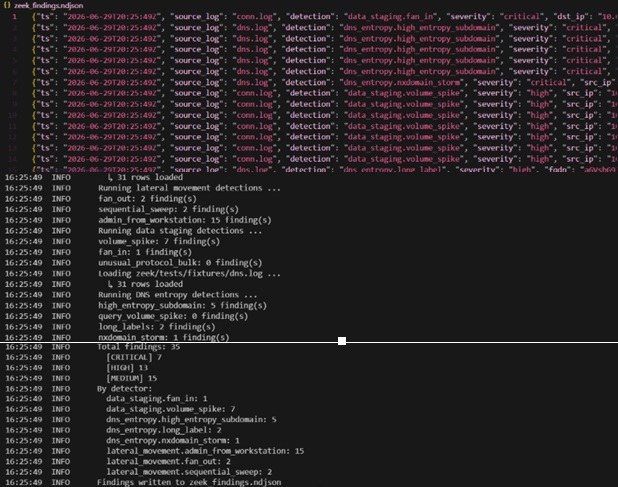
(3) Zeek Log Analyzer (zeek/)
Zeek is a network analysis framework that runs on your VPC traffic (via VPC Traffic Mirroring) and writes structured logs. This tool reads those logs and looks for attack patterns.
zeek/analyzer.py — the entry point. Loads conn.log and dns.log from disk, hands them to the detection modules, collects findings, and writes NDJSON (Newline Delimited JSON) output.
zeek/detections/lateral_movement.py — looks for signs an attacker is moving through your network after an initial compromise:
- Fan-out: one internal host making SSH/RDP connections to 5+ other internal hosts (credential spray or worm)
- Sequential sweep: connections to incrementally addressed IPs (automated scanning)
- Admin from workstation: successful SSH connections between internal hosts where the source isn’t a designated jump host – violates zero trust since all admin access should go through SSM (AWS System Manager – operation hub to manage E2 instances) or a bastion
zeek/detections/data_staging.py — looks for signs an attacker is collecting data before exfiltrating it:
- Volume spike: a single source→destination pair transfers more than 100 MB (database dump, file copy)
- Fan-in: many internal hosts all sending large transfers to one destination (staging host)
- Unusual protocol bulk: large transfers on non-standard ports (custom exfil tooling)
zeek/detections/dns_entropy.py — looks for malicious DNS behaviour:
- High-entropy subdomains: random-looking subdomain labels that indicate DGA (Domain Generation Algorithm) malware trying to find its C2 server
- Query volume spike: one host making hundreds of DNS queries per hour (C2 beaconing)
- Long labels: subdomain labels >50 characters (DNS tunnelling tools like iodine encode data in DNS queries)
- NX domain storm: a host getting NXDOMAIN on 70%+ of its queries (DGA malware cycling through generated domains)
What it produces: NDJSON findings to stdout or a file, one JSON object per line. Designed to be ingested into S3/Athena or OpenSearch for historical analysis.
(4) Gap Analyzer (gap_analyzer/)
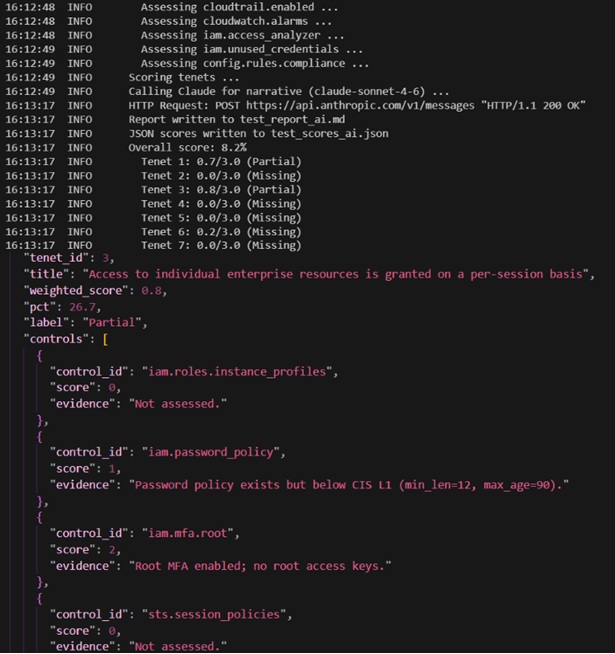
gap_analyzer/controls/aws_controls_map.py — pure data; Maps each of the 7 NIST SP 800-207 Zero Trust tenets to concrete AWS controls with a scoring rubric (0=missing, 1=partial, 2=implemented, 3=automated)
gap_analyzer/nist_800_207.py — the analyzer;
Makes live read-only AWS API calls to check whether each control is actually in place (ex. Is GuardDuty enabled? Is CloudTrail multi-region with log validation? Are there Security Groups open to the internet? Is root MFA enabled? Are there stale access keys?) > scores each tenet (principle used to resolve trade offs) 0–3 > feeds the scores to Claude > Claude returns an executive summary and prioritized remediation list > Exports a Markdown report.
Why it matters: lists misconfigurations while mapping the actual AWS posture against a published security framework; tells you specifically what to fix in order of impact
Hover for more info on tenets level.(5) Infrastructure files
ansible/inventory/hosts.yml — tells Ansible which EC2 instances to harden; Mode 1 for static IPs for testing, Mode 2 for aws_ec2 dynamic inventory plugin that queries the AWS API at run time based on instance tags
ansible/inventory/group_vars/all.yml — global CIS override settings; Which CIS rules to skip, SSH policy, password policy, audit config
ansible/inventory/group_vars/ec2_ubuntu.yml — Ubuntu-specific setting; Crucially, sets ansible_connection: aws_ssm so Ansible talks to instances through SSM Session Manager rather than SSH — no port 22 needed, which directly supports zero trust
ansible/playbooks/scan_pre.yml and scan_post.yml — run OpenSCAP (framework used to enforce security compliance and vulnerability baselines on Linux systems) before and after hardening to produce a compliance score. The post-scan playbook diffs the results and fails if hardening introduced regressions (controls that were passing before but aren’t after)
ansible/playbooks/ai_review.yml — calls sg_diff.py after the hardening run
Testing – tested against live ec2 instances in AWS Console
In simple terms, a VPC is a network and an EC2 instance is like a VM that sit in the network.
Note: Ansible does not run on windows machine, have to test through wsl
Need boto3 – AWS Software Development Kit (SDK) for Python; can interact with AWS EC2 through scripts
pip install boto3 moto[ec2,securityhub,sts] pytest pytest-cov -r requirements.txt
Installs boto3
Commands to set up aws cli and deploy live ec2 instances in README.md
Note: There is a limit to 5 VPCs to each region, change regions if necessary.
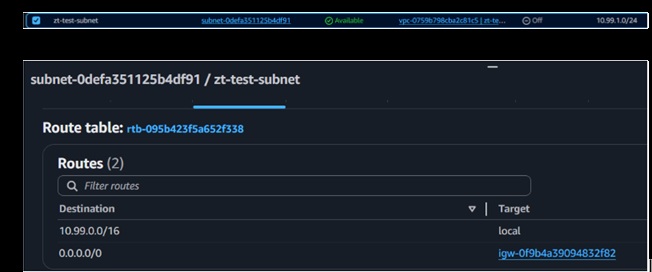
Step 1) Create a VPC > Enable DNS hostnames > Create a subnet > Create and attach an Internet Gateway > add route to the internet
What it looks like in AWS console
VPC created:
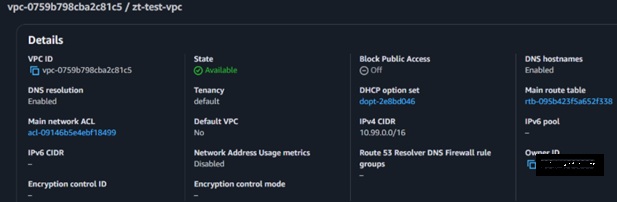
Subnet & Routing table:
Step 2) Create security groups – 1 deliberately bad/misconfigured – with open SSH (22 port) RDP (3389 port) and default All traffic egress rule and 1 clean one with port 443 (HTTPS)
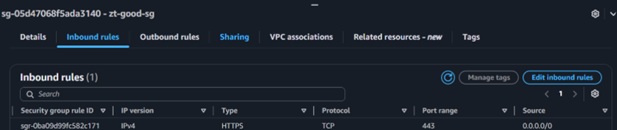
Good – 443 allows only trusted ips; uses end-to-end encryption (via TLS/SSL); allows stateful filtering meaning inbound traffic and outbound traffic on port 443 is allowed

Bad – Rule that allows unrestricted internet access (0.0.0.0/0 or ::/0) on admin ports like SSH (22) or RDP (3389)

Bad – All traffic allowed to go outbound
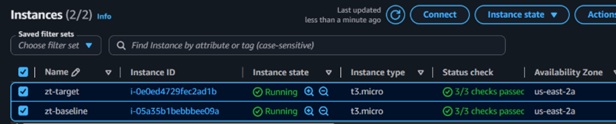
Step 3) Launch ec2 instances
(1) SG Auditor
python3 auditor/sg_auditor.py \
--regions us-east-2 \
--output test_findings.json
This posts findings to Security Hub and writes the full ASFF JSON to test_findings.json
(2) Gap Analyzer
python3 gap_analyzer/nist_800_207.py \
  --region us-east-2 \
  --output test_report_ai.md \
  --json-output test_scores_ai.json
(3) Zeek Log analyzer
python3 zeek/analyzer.py \
  --conn zeek/tests/fixtures/conn.log \
  --dns zeek/tests/fixtures/dns.log \
  --output zeek_findings.ndjson \
  --min-severity low
(4) AI reviews – sg_diff
Take a current state of the bad SG
aws ec2 describe-security-groups \
  --group-ids $BAD_SG_ID \
  --region us-east-2 \
  --output json > /tmp/sg_before.json
echo "Before snapshot saved"
cat /tmp/sg_before.json | python3 -m json.tool | head -30
Rule modification - remove RDP rule
aws ec2 revoke-security-group-ingress \
  --group-id $BAD_SG_ID \
  --protocol tcp \
  --port 3389 \
  --cidr 0.0.0.0/0 \
  --region us-east-2
echo "RDP rule removed"
Do a dry run or use claude
python3 reviewer/sg_diff.py \
  --before /tmp/sg_before.json \
  --after  /tmp/sg_after.json \
  --instance zt-target \
  --role app \
  --env test \
  --owner yourself \
  --dry-run
To run with claude, change last line: —output /tmp/review_findings.json
This article is a basic overview of firewalls, principles, and the AWS console with an implementation of the ZTA principles by hardening. Thank you for reading, if you’d like to try it please clone my repo and use the commands in the README.md. The goal is to understand what a good SG policy looks like and work with live ec2 instances to understand the AWS console. Remember to delete the instances after as there are open ssh port 22 connections open which leave those instances vulnerable.